Aaron ButlerCreative Design

Jack's Image Vault

A custom digital asset manager for Mac (and Windows) that indexes images spread across multiple external drives, with fast thumbnails, search, tagging, and duplicate detection. Built for a 79 year old non-technical, well established photographer and artist.

RoleSr. Creative Technologist
Year2026
Skills
PRODUCTUI/UXLLM
01
Overview

A vault for 218,996 files

Jack's Image Vault is a desktop app for Mac and Windows (Mainly Mac) that turns a sprawling, disorganized media collection into something my dad can actually browse and search. It scans his seven external USB drives (or local), builds a fast thumbnail grid, and lets him organize everything with categories, tags, and comments. It never moves the files; it sits as a layer on top of where they already live.
The app logo for Jack's Image Vault. I pieced this together from one of his art pieces as a simple homage to Jack and his wife, my mom, of over 50 years.
02
Challenge

Built for Jack

I built Jack's Image Vault (JIV) first and foremost for my dad, Jack Butler, a non-technical artist and photographer with forty years of work behind him, sitting on 218,996 files spread across seven external USB storage drives. Lightroom and the other prosumer tools were too complex or wanted to duplicate and pull everything into their own library format. I didn't want him to have to figure out solutions to the pain points these products would introduce. I wanted him to have something simpler: Jack opens the app, sees his images, finds the images he's either looking for or, as equally important, all the images he forgot he had.
03
Capabilities

What it does

Since my dad only uses image file formats right now that's what I focused on supporting for the initial deliverable. If he ever needs support for other file types, audio or video, etc the basics are already built in and ready for him.
JIV covers all the file formats he uses, on top of giving a non-technical user real organizational tools with little to no learning curve. I'm a firm believer in tooltips and use them extensively as a means to remove ambiguity as well as reminders in the event he forgets how something works.
Browse & organize
Virtualized thumbnail gridNested categoriesFree-form tagsPer-file commentsPinned favoritesAdjustable thumbnail sizeOffline file viewing
Find
Filter by type / date / sizeEXIF metadata filtersNatural-order sortDebounced searchDuplicate detection (perceptual hash)
Formats
Photos + RAW (23)PSDPDFHEICTIFFWebPAISketchVideoAudio
Trust
Files never movedOffline-drive detectionBackup & restoreAuto-update
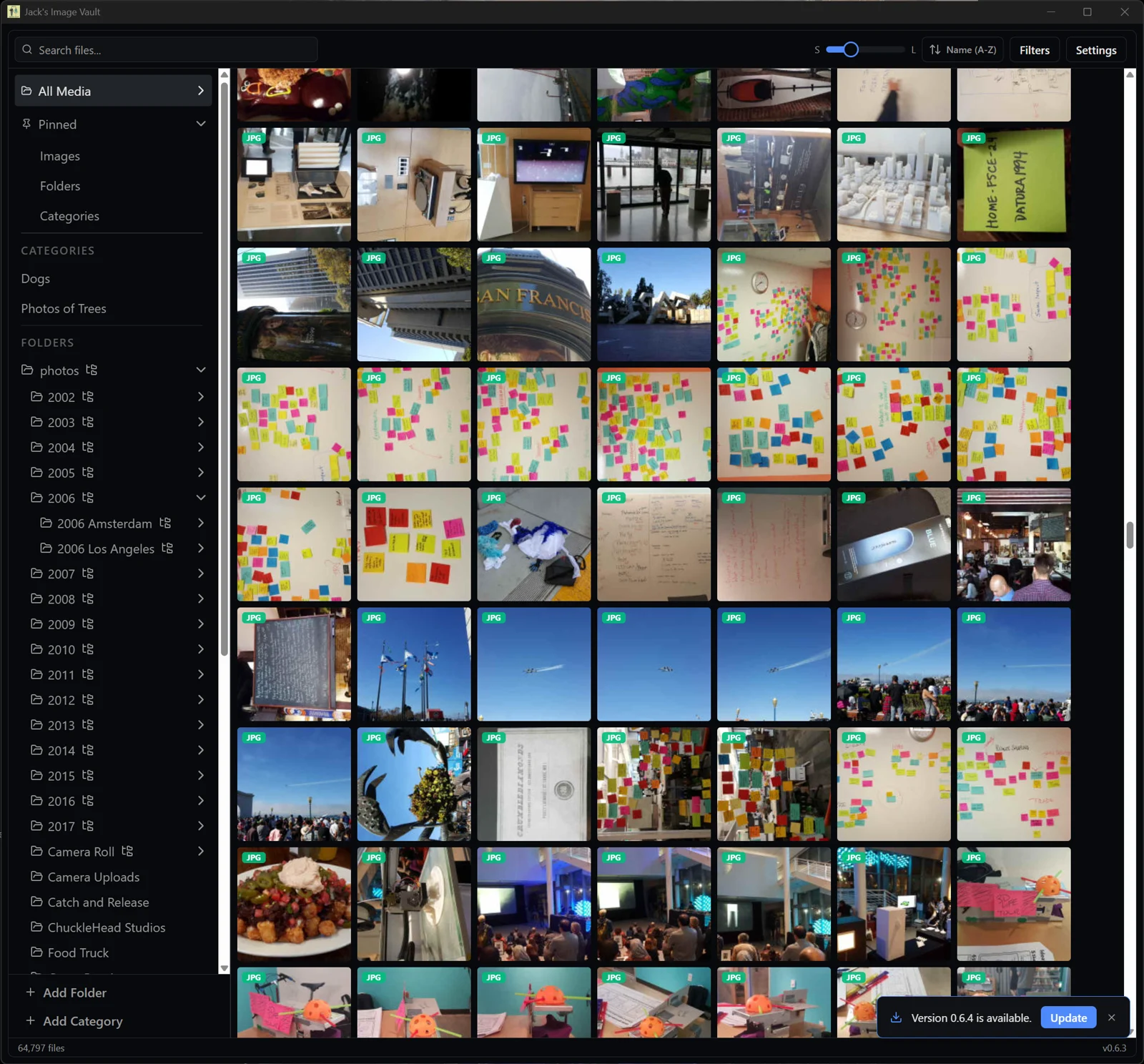
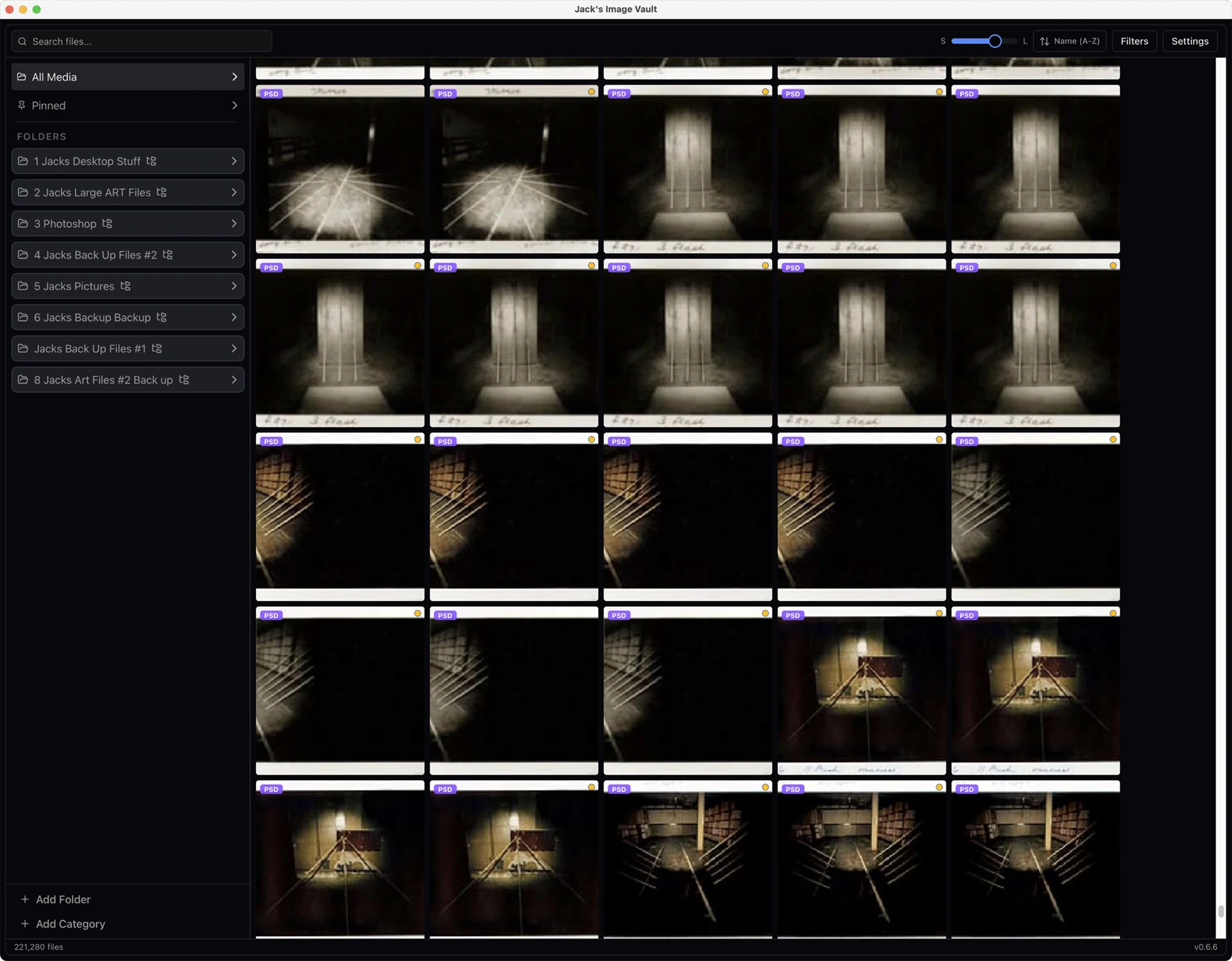
The main library view: a virtualized thumbnail grid beside a folder tree, categories, and pinned shortcuts. The upgrade mechanism is visible in the bottom right. **Note: My images used for testing.**
The main library view: a virtualized thumbnail grid beside a folder tree, categories, and pinned shortcuts. The upgrade mechanism is visible in the bottom right. Note: My images used for testing.
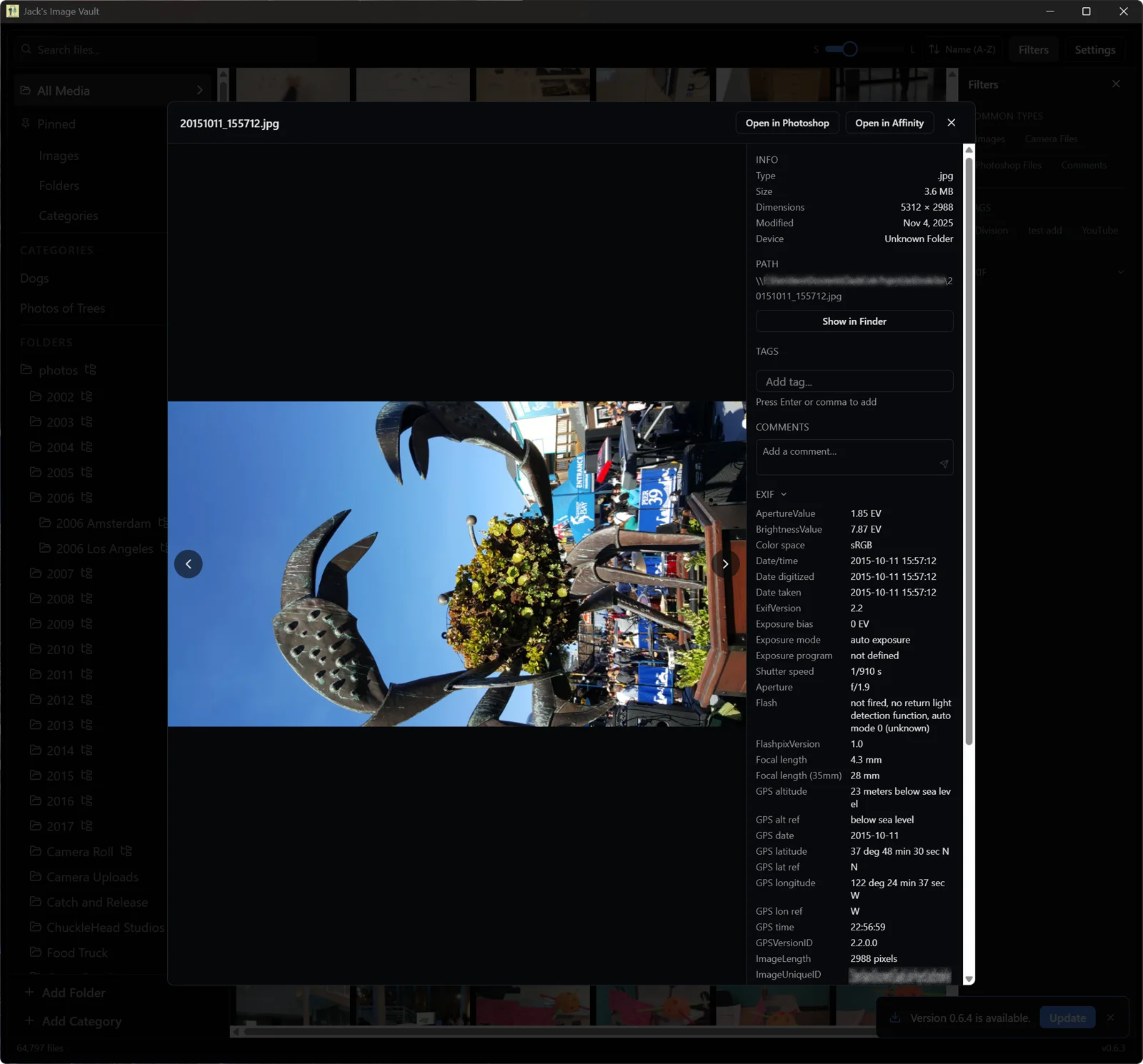
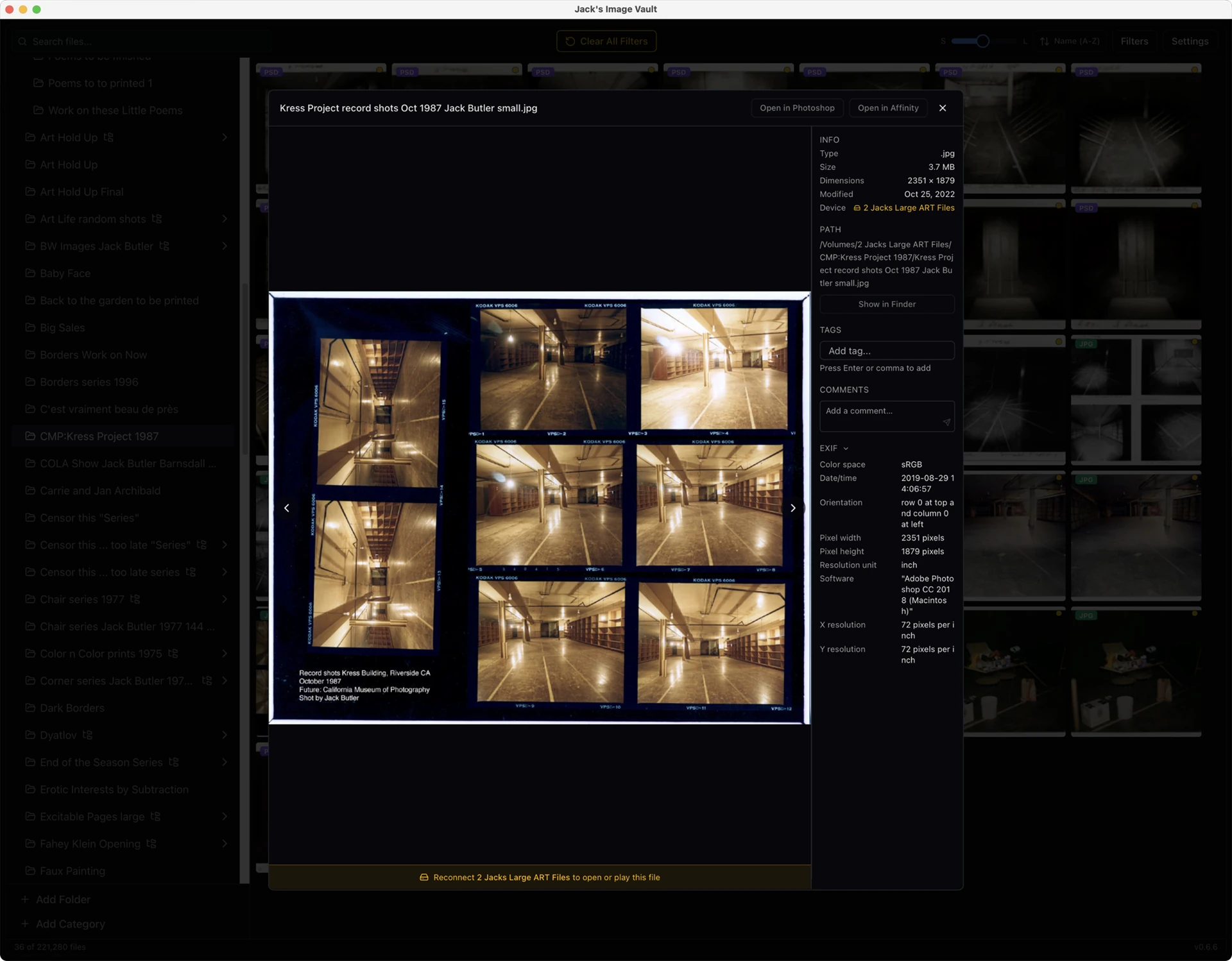
The preview panel carries a file's info, tags, comments, and full EXIF, with one-click open in Photoshop or Affinity. The original file never moves. **Note: Note: My images used for testing.**
The preview panel carries a file's info, tags, comments, and full EXIF, with one-click open in Photoshop or Affinity. The original file never moves. Note: Note: My images used for testing.

Folder rename

The app never moves his files, with one deliberate exception. Jack can rename a folder from inside the app and it renames the real folder on disk, then keeps the entire catalog in sync. I gated the action behind a plain-language confirmation ("This renames the actual folder and updates every file inside it"), because it's the single place the app reaches out and changes the filesystem Jack trusts it not to touch during regular use.

Drives come and go

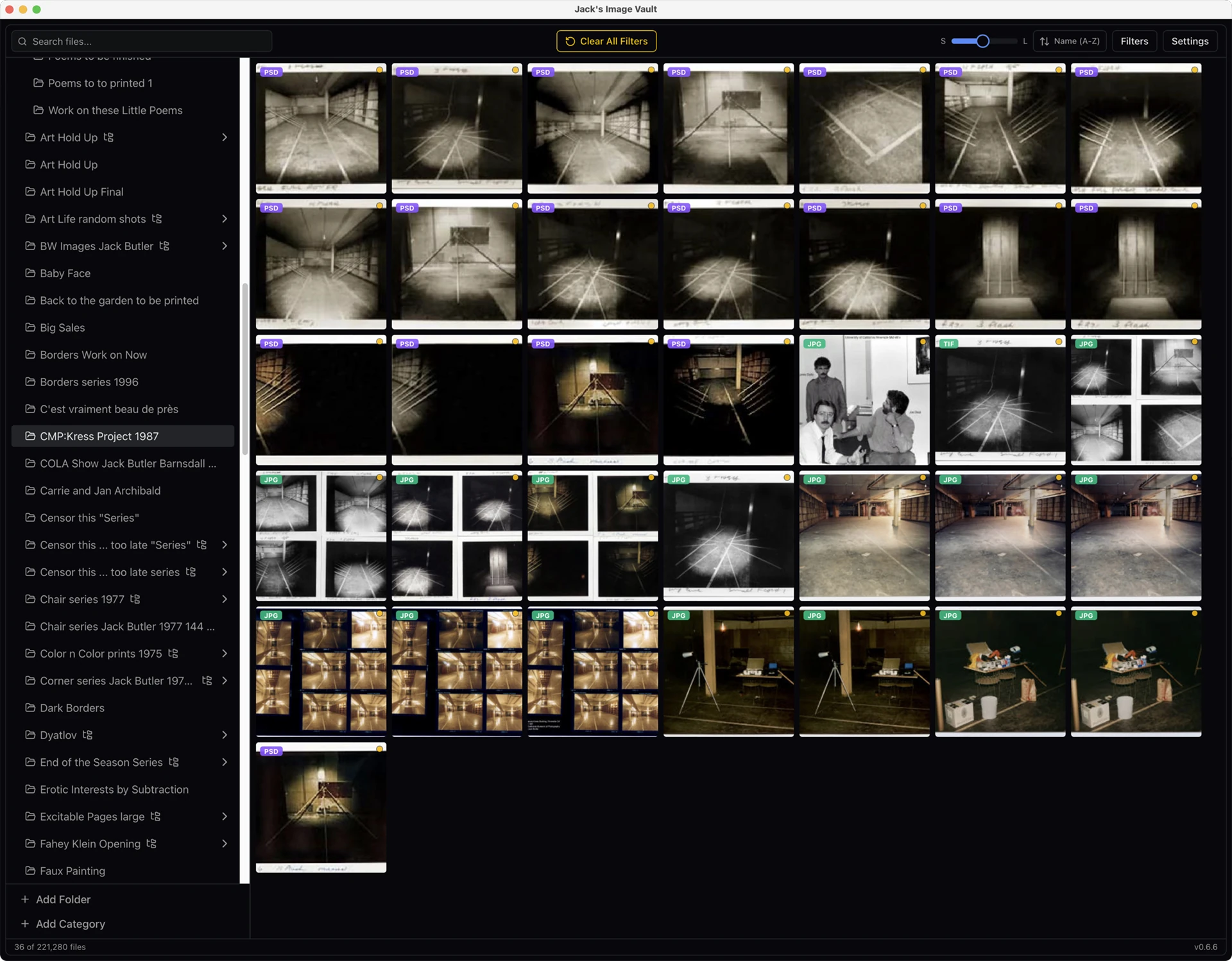
Jack keeps the seven USB drives connected at all times but powered down, and only powered on when he wants to open or change a file. The JIV catalog stays fully browsable even when they're all off; the app remembers what lives on each volume and shows an amber dot for anything offline, along with other helpful signifiers, so a sleeping drive simply reminds Jack it needs to be turned on if he wants to make changes.

Settings

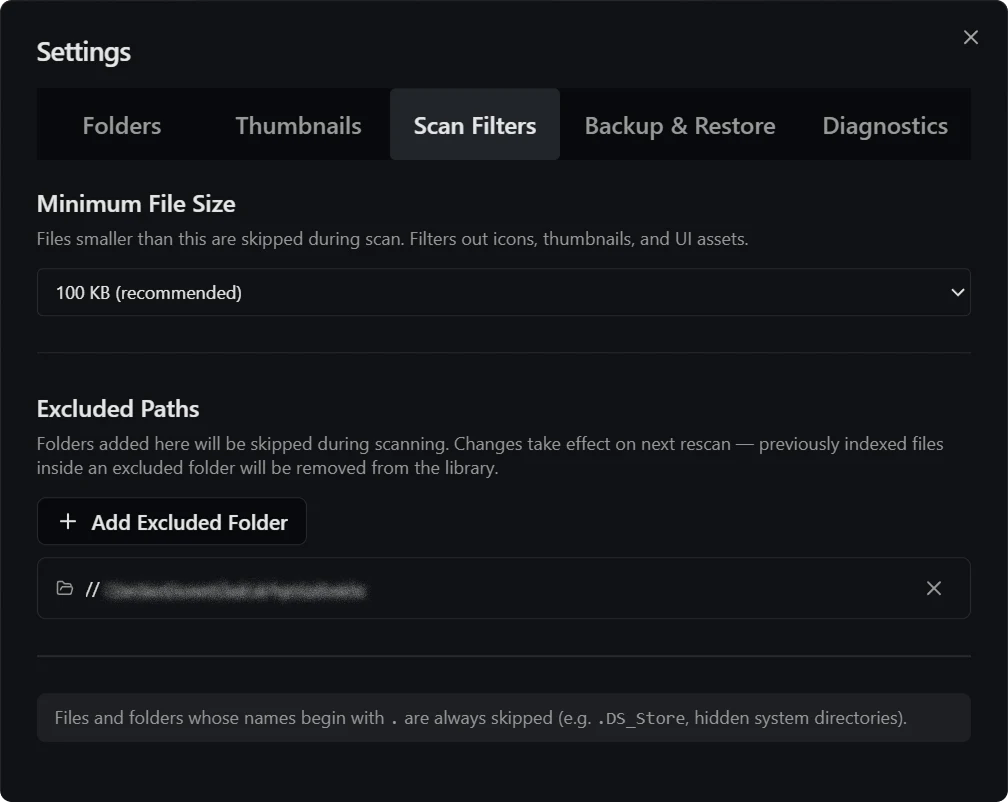
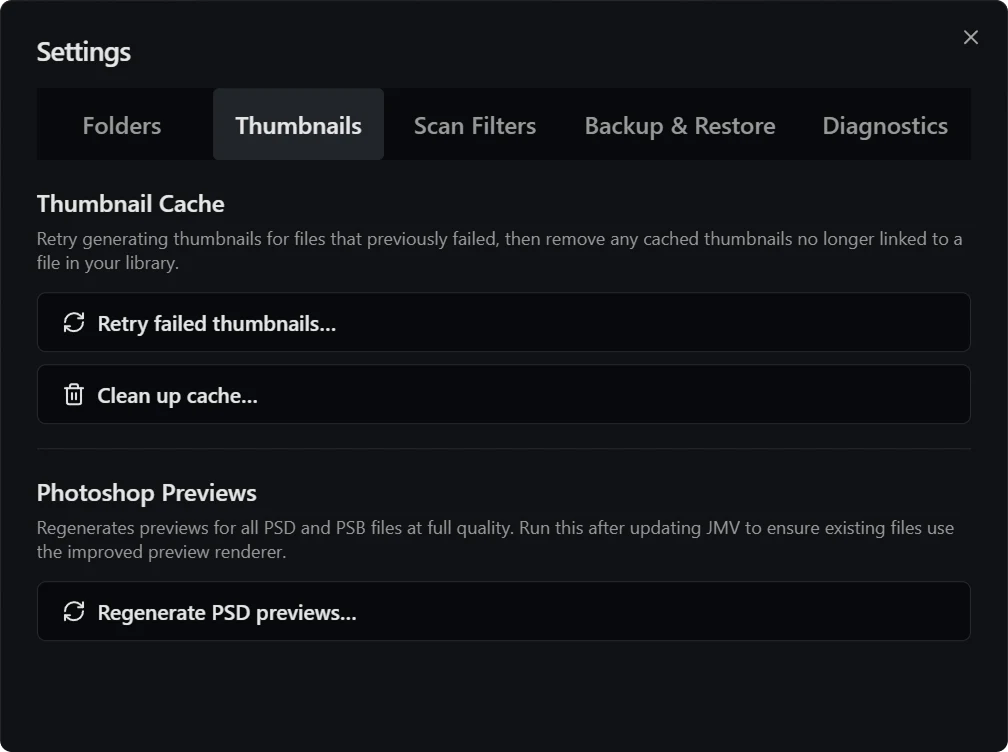
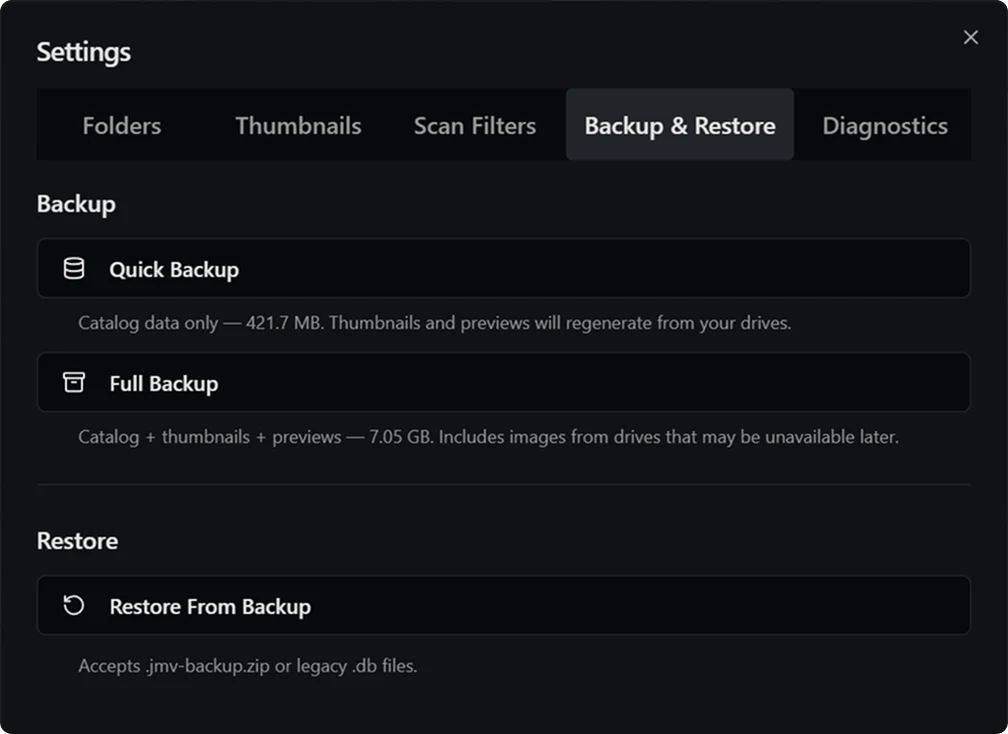
For Jack, I leaned into plain language signifiers where possible. To access the apps settings the button says, "Settings" instead of an icon. Most of the time Jack doesn't need to both with access settings in the first place, but when he does there's descriptions and tooltips to remind him what things do without putting complexity in front of a non-technical user: which folders to watch, what to skip on a scan, thumbnail upkeep, and a one-click catalog backup.
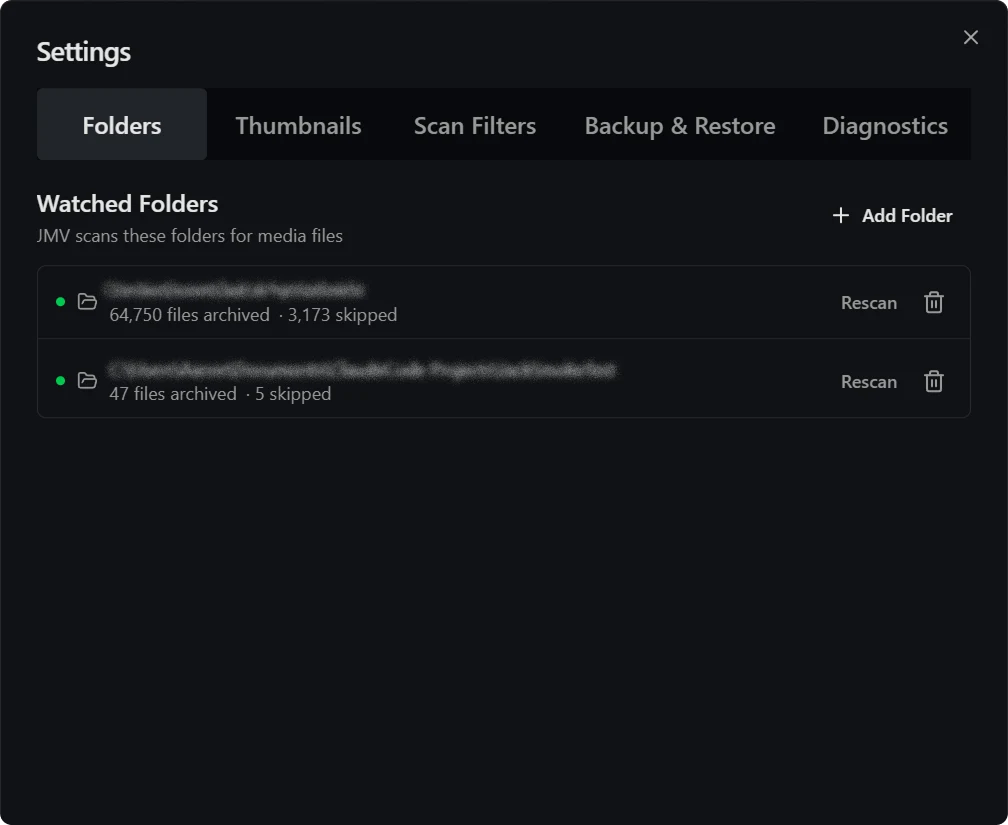
Folders: the drives and folders the app watches, each with its own rescan.
Scan Filters: a minimum file size and any folders to exclude.
Thumbnails: cache upkeep and full-quality Photoshop preview regeneration.
Backup & Restore: a quick catalog backup or a full archive that survives an offline drive.

Send me the logs!

Because Jack is currently the only user, and his Mac is the only Mac this runs on, I built the app to tell me what's wrong without him having to. Structured logs ship home through a Cloudflare Worker as a private diagnostic bundle. A recent update accidentally broke thumbnails after a folder rename; I never asked Jack to reproduce it or read a console, because the cause was a single line in his uploaded log. I had Claude trace it and fix it, then shipped a patch Jack quietly auto-updated into. From diagnosis to fix to a release in his hands, Jack never debugged a thing.
It runs on his Mac as the daily driver for the whole library, with Windows as my development side. It is the kind of project where the success metric is simple: he opens it, finds the photo, and never thinks about the 218,996 files underneath. Speed was the means rather than the end. A catalog that feels slow gets opened less, and one that goes unused surfaces nothing he'd forgotten he had.
One feature in the settings menu that proved critical and saw heavy use during testing phases was a button labeled, "Send diagnostic report now". I implemented this to allow Jack to help me test the app remotely. When something happened or I wanted to check diagnostics, he simply had to press a single button. If you want to know the more technical details of this button check this DEEPER FEATURE item.
Deeper Feature: "Send diagnostic report now"
When Jack presses "Send diagnostic report now", the app gathers a snapshot of its own health rather than asking him for any information. On the Rust side it collects the rolling log file, builds a context.json describing the environment (app version, macOS version, CPU/RAM, mounted drive count, total indexed files, and whether the last shutdown was clean), and picks up any recent macOS crash files — capped at two, with previously-sent ones excluded so the same crash isn't reported twice. Those get zipped and POSTed to a Cloudflare Worker, authenticated with a private key header that's compiled into the binary at build time. The UI stays honest about the wait: since packaging can take 30–45 seconds while the app is busy scanning, I have the button show a spinner with a "this may take a minute" hint, it then falls back after 15 seconds to "uploading in the background" and quietly polls the last-sent timestamp so Jack gets confirmation without staring at a stuck spinner.

On the other end, the Worker authenticates the request, unzips it in memory, and turns it into two GitHub objects: a secret gist holding the raw diagnostic files, and an issue in the private repo labeled crash-report whose body is a readable summary table (version, OS, hardware, drives mounted, total files) linking to that gist. The result is that a problem arrives already triaged and I get a notification with the environment summarized and the full logs one click away, without Jack ever opening a console, describing symptoms, or knowing a report was worth sending. The same pipeline also runs automatically when the app detects it didn't shut down cleanly, so the button is really just the manual door onto a path that usually fires on its own.
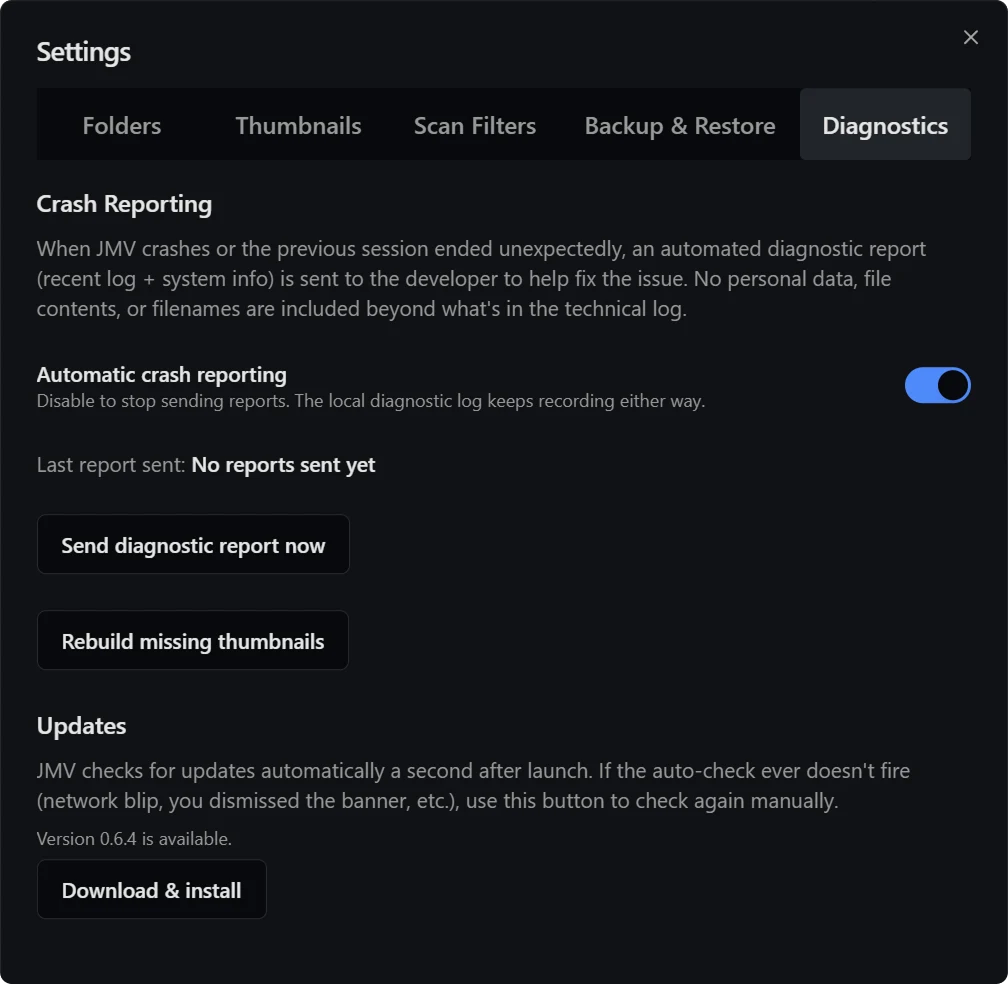
The Diagnostics panel: crash reports ship home automatically as a private log bundle, so I can fix problems Jack never has to notice or report.
04
Build

A Rust core under a web UI

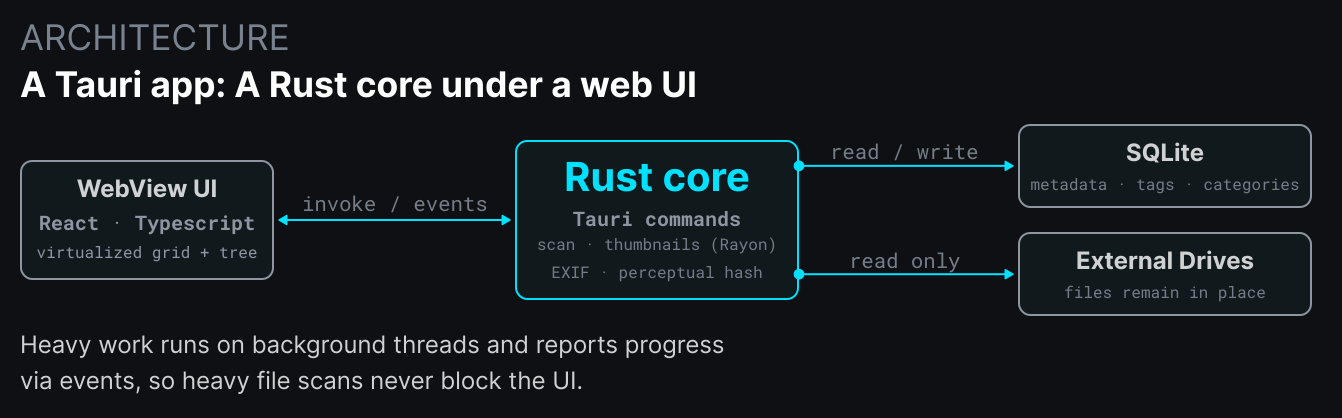
The app is built with Tauri: a Rust backend with direct system access, paired with a web UI (React and TypeScript) running in the platform WebView. File scanning, thumbnail generation, EXIF extraction, and duplicate hashing all run in Rust on background threads, while the interface stays responsive and just listens for progress events.
Metadata lives in a single SQLite file: the index of every file, plus categories, tags, comments, and EXIF values. The media itself stays exactly where it is on disk. That keeps the whole catalog easy to back up and restore, and it means the app respects the folder structure the user already has rather than demanding they migrate into it.
A constraint worth naming: I don't own a Mac. I develop entirely on Windows, and Jack's machine is the only macOS environment this code runs on. That shaped the architecture: I had Claude push as much logic as possible into platform-agnostic, testable code, and kept the Mac-specific pieces a thin shim, so I could trust a release to work on a machine I'd never get to see.
A Rust core handles scanning and thumbnails on background threads; SQLite holds the metadata; the original files never move.

The 43-second freeze

The hardest part of the project was not a feature, but a performance crisis. As Jack scanned more drives and the library grew, opening a preview started to lag, then stall, and eventually froze the app altogether for a full 43 seconds making it unusable.
What followed was five rounds of backend optimization. Multiple issues were uncovered and resolved; Synchronous commands were blocking the main thread, so Claude made them async. The query was dumping tens of thousands of rows over the bridge at once, so Claude paginated it. A single database lock was serializing reads, so Claude added a read-only connection pool. Every one of these was a real bug, and while fixing them was real progress...none of them was the cause of the freeze.
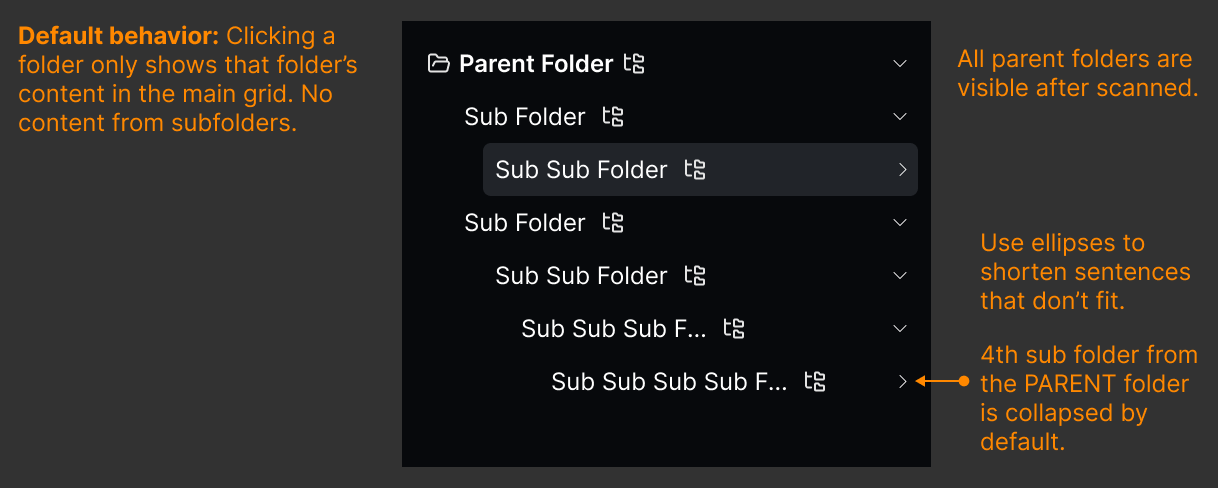
The breakthrough came from instrumentation, not cleverness. Previously I had Claude add a variety of metrics, one being measurement: time from click to content actually on screen. That mark proved the stall lived in the JavaScript layer, not Rust. One cheap test settled it before a line of the fix was written: have Jack collapse every folder in the sidebar and try again. Expanded, the preview took 42.9 seconds. Collapsed, it took about a third of a second. The culprit was the left-hand folder tree, rendering hundreds of thousands of un-virtualized DOM nodes every time the view updated. Virtualizing it took the freeze from 42.9 seconds to about 300 milliseconds.
Five eras of optimization shipped on guesses that looked like progress because each one fixed something real. The actual fix only arrived once I measured what the user felt. Instrument the experience, not just the parts you already suspect.
05
Outcome

A fulfilling project

With Claude Code's help I was able to build the desktop application my dad needed and the results have been better than expected. Twice he's called me to let me know how great JIV was working for what he was doing at the time. Being able to supply my dad with a tool he's actively using and that helps him in his creative process has made Jack's Image Vault one of the most rewarding products I've been able to build using my skillset. I look forward to expanding JIV's feature set as Jack gets more comfortable using it and starts wanting it to do more things.

In Jack's words

I asked him to write down how it's been working out.

I have been an Artist for over forty years so logically I have accumulated an enormous number of images. The storage of said images has always been problematic and has required numerous external hard drives as computer failure has left me paranoid about saving anything to my personal computer. The problems created by this method are ease of access to all the images which when stored on separate external hard drives initiates a prolonged and tedious search methodology. I could easily forget particular images or the location where I stored them or even which folder they were stored under, just too many items to manage.

I complained numerous times to my son regarding this problem so he decided to solve it for me. He designed a program "Jack's Image Vault" which allows me to access all my files on all my external hard drives in one program at one time. The results have been spectacular from a time saving point of view and has allowed me to search and find images I have not seen in years. His insight and problem solving have been excellent and this program has taken an extreme weight off my shoulders and relieved a great deal of anxiety as regards my past and present work. The ease of finding and opening images is amazing and my wonder at having access to all my images at one time cannot be overstated.

Jack Butler, Artist, 2026jackbutlersart.com