
01
Overview
Claude Code + Unreal
UE-Bridge is an MCP server that puts Claude inside the Unreal Editor: reading and writing Blueprints, automating the editor, and most importantly, finding the right page in Epic's own documentation and gameplay patterns on demand. My main motivation for building UE-Bridge is to help me learn Unreal Engine and solve problems I run into. It can build things on its own (a hot topic for Unreal MCP tools, like "build me an entire game!"), but that isn't the goal. It just needs to know how things are built in order to convey that knowledge to me when I ask. After enough time working with Claude I was confident enough to try making the tool I wanted rather than waiting for one, and this is how that went.
Claude wrote the code. I set the direction, designed the architecture and the rules it follows, tested it against real project work, and decided when an answer coming back was wrong.
02
Challenge
Why I built it
I wanted to take advantage of Claude's problem-solving capabilities inside Unreal Engine: to rely less on YouTube tutorials and instead have a single source of truth based on Epic's own documentation and examples. Then, whenever I want to build a new mechanic, system, material or anything else in Unreal, I can ask Claude questions about how to build it or have it generate an example that I can study and dissect on my own to figure out how it works. I can also point Claude at a Blueprint, a level, or a material, talk through any problems I might be having, and have it scaffold the work, without leaving the editor or copy-pasting context back and forth.
I'll admit I was also motivated by not wanting to pay for an existing Unreal MCP tool, Aura. It's capable and feature-rich, but it would add a second monthly subscription for a Claude plan tied only to Aura, on top of the Claude Max 5x plan I already use for other projects. Building my own, shaped around how I want to work in Unreal, felt like the next challenge.
03
Build
Standing on a working base
I didn't start from a blank file. The hard part of driving Unreal from the outside is its Python Remote Execution socket protocol, and an existing MIT-licensed project, runreal/unreal-mcp, had already solved it cleanly in TypeScript and shipped a solid base tool set.
Forking it was the pragmatic call: inherit the part that's hard and well-tested, then spend my effort on the parts that make the tool mine: Blueprint introspection, a second connection into the editor, and a knowledge layer. The existing implementation was solid, and rebuilding it would not have made the tool any better.
Two channels into the editor
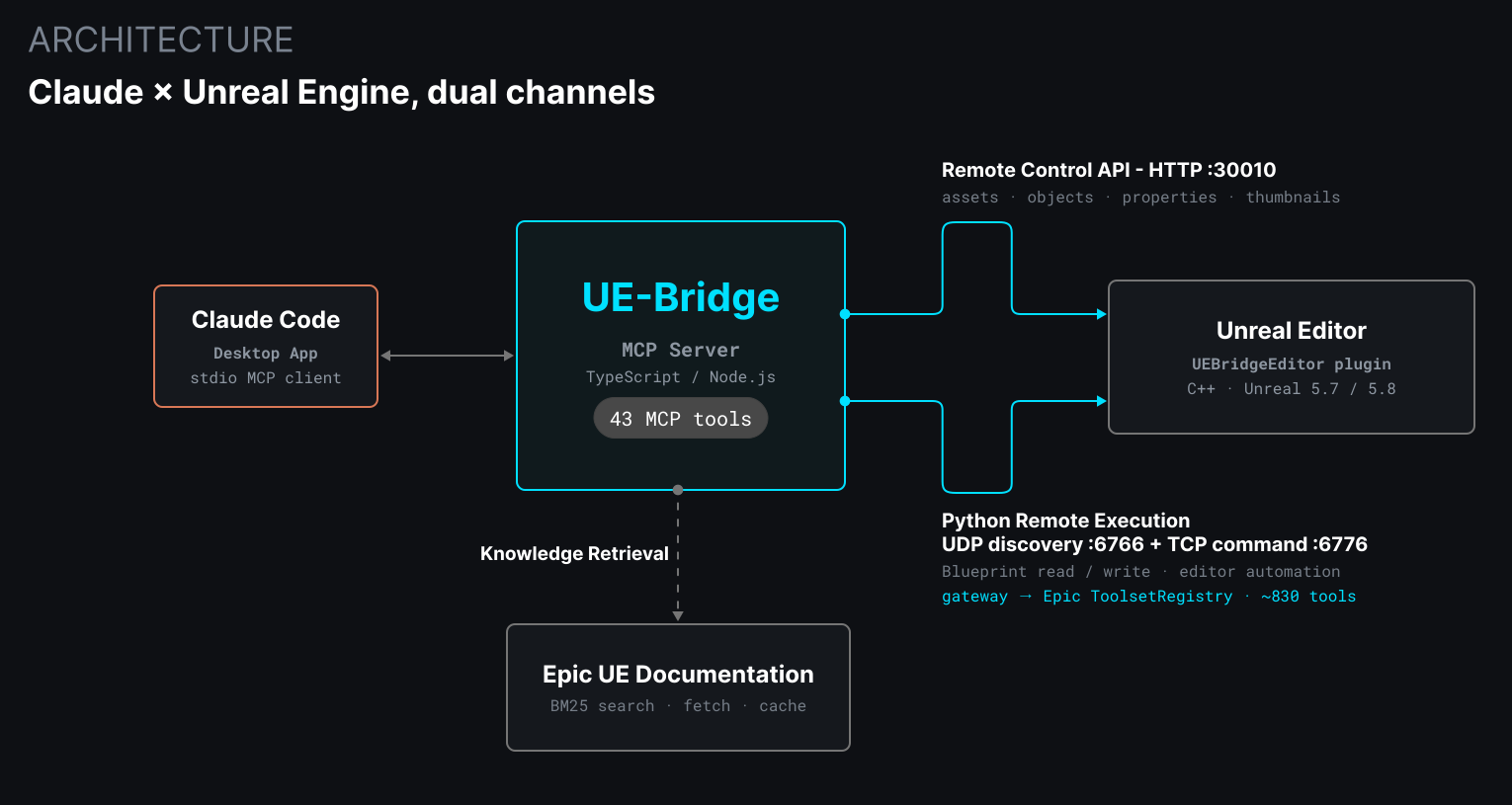
Unreal exposes two very different ways in, and rather than force everything through one, UE-Bridge speaks both.
The Remote Control API is an HTTP service on port 30010. It's fast and stateless, and it handles the queries that suit it: reporting on the running editor and reading object properties. Python Remote Execution is a separate TCP socket on port 6689. It's stateful, and the only path for arbitrary Python inside the editor; that's where the heavy lifting lives: serializing a Blueprint to JSON, automating the editor, writing changes back.
There's a trap the project documents so I don't fall into it twice: the Remote Control API can't run Python, and calling its execute route just returns a 404. The two channels are separate systems, so the architecture treats them that way rather than pretending one can do the other's job.
Where neither official path reaches far enough, a small C++ editor plugin, UEBridgeEditor, fills the gap. Unreal can list a Blueprint's variable names natively, but not the shape around them: flags, tooltips, categories, the default value held on the class object. That metadata has no native equivalent, and it's what makes introspection useful rather than merely complete. The plugin only exists where it has to, which later became a rule. It carries a real cost worth stating: it has to be compiled, so the deepest introspection isn't a one-line install.
Three pillars, one rule
The work is organized into three independent pillars, so I can push on whichever one matters that week without blocking the others.
Pillar 1 is introspection: reading the project as structured data. The main tools are read_blueprint, which serializes any Blueprint to JSON (its variables, functions, event graphs, and component hierarchy, each tagged blueprint / inherited / native), and read_widget_blueprint, which does the same for UMG (Unreal's UI system) widgets, down to the nested widget tree, slot info, bindings, and animations.
Pillar 2 is authoring: creating and editing. Scaffolding Blueprints, adding typed variables and functions, spawning and updating actors, and checking the result is structurally sound before anyone runs it. Reading is safe and writing isn't, so authoring moves more carefully than the other two.
Pillar 3 is knowledge: giving Claude a searchable index of Unreal's documentation, so it can find and cite the right Epic page; reading the full pages is the next step.
One rule sits above all three: Official-Epic-First. Whether Claude is answering a question or building something, it reaches for what Epic already provides and documents (Python, Blueprint libraries, engine functions) before writing anything custom. Without that rule, Claude tended to code things from scratch, and getting them working usually took several rounds of back and forth between us. Custom code and Blueprints are still fine, but they're reserved for what Epic hasn't documented, where the extra time is worth spending. The C++ plugin follows the same rule, and it keeps the tool durable as Epic evolves the engine.
The pivot
The one moment the plan broke was the knowledge layer. My original design had UE-Bridge doing its own semantic ranking internally, via an embedded library making programmatic API calls to a model to score and pick the most relevant search results.
Mid-build, a question surfaced: would that incur cost outside my existing Claude plan? It would. At the time, a subscription-versus-API-key billing distinction meant programmatic calls from a third-party tool would have needed a separate paid key instead of drawing on what I already paid for. That was a second billing surface, and a violation of a principle I'd set early: single vendor, one cost.
So I pivoted. Instead of an internal ranking library, UE-Bridge ships two plain tools: ue_search_corpus runs a local BM25 search and returns candidates, and ue_fetch_pages retrieves and caches the pages. The semantic ranking the library would have done is now done by Claude itself, inline, using the conversation it already has. Lighter code, no second bill, and Claude brings more context than my library ever could have. The lesson I wrote down: verify a vendor's billing terms before you build an architecture around them.
A smaller wrinkle from the same layer: UE-Bridge keeps a local index of Epic's documentation catalog, titles and one-line summaries for about 1,700 pages, so Claude can find the right page without browsing the live site. Page requests are rate-limited and cached to keep traffic to Epic's servers light.
830 tools behind three
UE 5.8 shipped Epic's own AI tool framework: around 830 official tools covering Blueprints, Sequencer, materials, actors, and static meshes. Claude couldn't reach any of it.
Registering all of them was the obvious move and the wrong one. Every MCP tool's schema loads into the model's context and stays there, so 830 schemas would eat an enormous slice of the context window before any actual work began. The gateway exposes three tools instead: a lightweight catalog of names and one-line descriptions gets filtered inside the editor, so only small slices cross the wire, and Claude searches, pulls the one schema it needs, then calls the tool. The trade is an extra round-trip compared to keeping every schema resident.
Blueprint event-graph authoring was a wall I hit during real project work. Epic's own Blueprint toolset already had the answer sitting there, out of reach until the gateway.
Reaching the tools was only half of it. Epic's 830 tools are only useful if the right one surfaces, and a designer asking to "run the game" isn't going to type the function's real name. So the catalog carries a short, hand-maintained list of synonyms that links everyday words to Unreal's own terms: "run," "play," and "test" also find Play In Editor, and "menu," "screen," and "HUD" also find UMG widgets. Six word groups cover hundreds of tools. Before them, "run the game" ranked the correct tool at number 384. After, number 11 out of 492 results. I knew UMG authoring was possible; the hard part was getting Claude to figure out how. For a month it told me UE-Bridge couldn't write UMG, while 23 tools for it sat unused in the registry.
Right atoms, invented assembly
I built an FPS character out of official Epic atoms. It compiled clean. It validated at zero errors. The pawn possessed correctly. No input ever fired.
Epic's own version puts AddMappingContext on the player controller. Their character has no BeginPlay at all. Every piece I'd used was correct and the assembly was invented, which is the failure mode you get when a model has the right vocabulary and no worked examples.
So the tool now includes them. A pattern library returns Epic-derived gameplay recipes with working node identifiers and the traps that fail silently, each one stamped with the exact engine build it was read from. Six so far.
Compiles clean, cannot run
A Blueprint that returns ok from a compile can still be structurally dead. I lost most of two working days to exactly that signature, so validate_blueprint now lints for it: logic that will never be reached, wired in a way the compiler has no opinion about. Five rules, three of them errors and two deliberately advisory.
Building it taught me something about the tooling underneath. Half of the first findings were false positives, because Epic's node-finding call reports only events as entry points, so any graph entered another way read as entirely unreachable.
04
Capabilities
The toolset today
UE-Bridge has 43 tools in total: 23 of its own and 20 inherited with the fork. The gateway adds on-demand reach into Epic's 830.
Project introspection
read_blueprintread_widget_blueprinteditor_get_world_outlinereditor_get_map_infoeditor_project_infoeditor_list_assetseditor_search_assetseditor_get_asset_infoeditor_get_asset_referenceseditor_validate_assets
Blueprint authoring & validation
create_blueprintadd_blueprint_variableadd_blueprint_functioncompile_blueprintvalidate_blueprint
Editor automation
editor_run_pythoneditor_console_commandeditor_create_objecteditor_update_objecteditor_delete_objecteditor_take_screenshoteditor_move_cameraeditor_export_asset
Patterns & knowledge
get_ue_patternue_search_corpusue_fetch_pagesue_lookup_classue_list_sourcesue_add_sourceue_remove_sourceue_enable_sourceue_disable_sourceue_refresh_sourceue_refresh_corpus
Remote Control (HTTP)
rc_infodescribe_object
Epic registry gateway
ue_toolset_searchue_toolset_describeue_toolset_call
Configuration
set_unreal_engine_pathget_unreal_engine_pathset_unreal_project_pathget_unreal_project_path
05
Outcome
First real test, and what's next
Test drive: a medical trade show booth
To test UE-Bridge end to end, I picked a scenario I'd wanted to build for a while: an event space, in this case a medical trade show booth showcasing an interactive device. I described what I wanted and asked Claude for a floor plan sketch, then marked it up with mockups and suggestions until the layout met my requirements.
From that plan, Claude built the space in Unreal almost exactly as I'd laid it out, down to the monitors and display tables, using placeholder lights and textures to box it out (a game-dev term for blocking in a space with simple shapes before any real art). It also set up a first-person character so I could walk the booth and see what navigating it would feel like in person.
Walking the space is where the device idea came from: something you could plug reusable objects into. I placed a simple shape on a table as a stand-in, took it into Blender to reshape it and add a square port, and modeled the piece that plugs into it. Back in Unreal, I had Claude turn both into interactive objects. The pickup mechanic took some back and forth, but it ended up working: I could pick the piece up off the table, carry it, plug it into the device, unplug it, and set it back where it started.
UE-Bridge passed its first real test: the booth went from a sketch to a space I could walk through and interact with. Using it to learn Unreal is the next stage, now that the tool is far enough along to rely on.
UE-Bridge is stable, and it's mid-journey. The introspection pillar still has component-hierarchy, animation, material, and behavior/state-tree readers queued. Authoring has the validation and pattern work behind it now, and the next stretch is making what it builds more reliable, so the examples I study are ones that actually work.
Unreal's online docs are a single-page app, so ue_fetch_pages currently retrieves the page shell (title, description, canonical URL) rather than the rendered body text. The next step is headless rendering to pull the actual prose, slotting into the caching and rate-limiting machinery that's already in place. The tool surface won't change; the thing behind it just gets smarter.
Anything that isn't engine-specific gets verified against both Unreal 5.7 and 5.8 before it counts as done. Some of the newer work is 5.8-only by design, because that's where the features it depends on live. On a single Claude subscription, it's what I set out to build: a way to learn Unreal with Claude working alongside me inside the engine.