01
Overview
A thinking partner inside the board
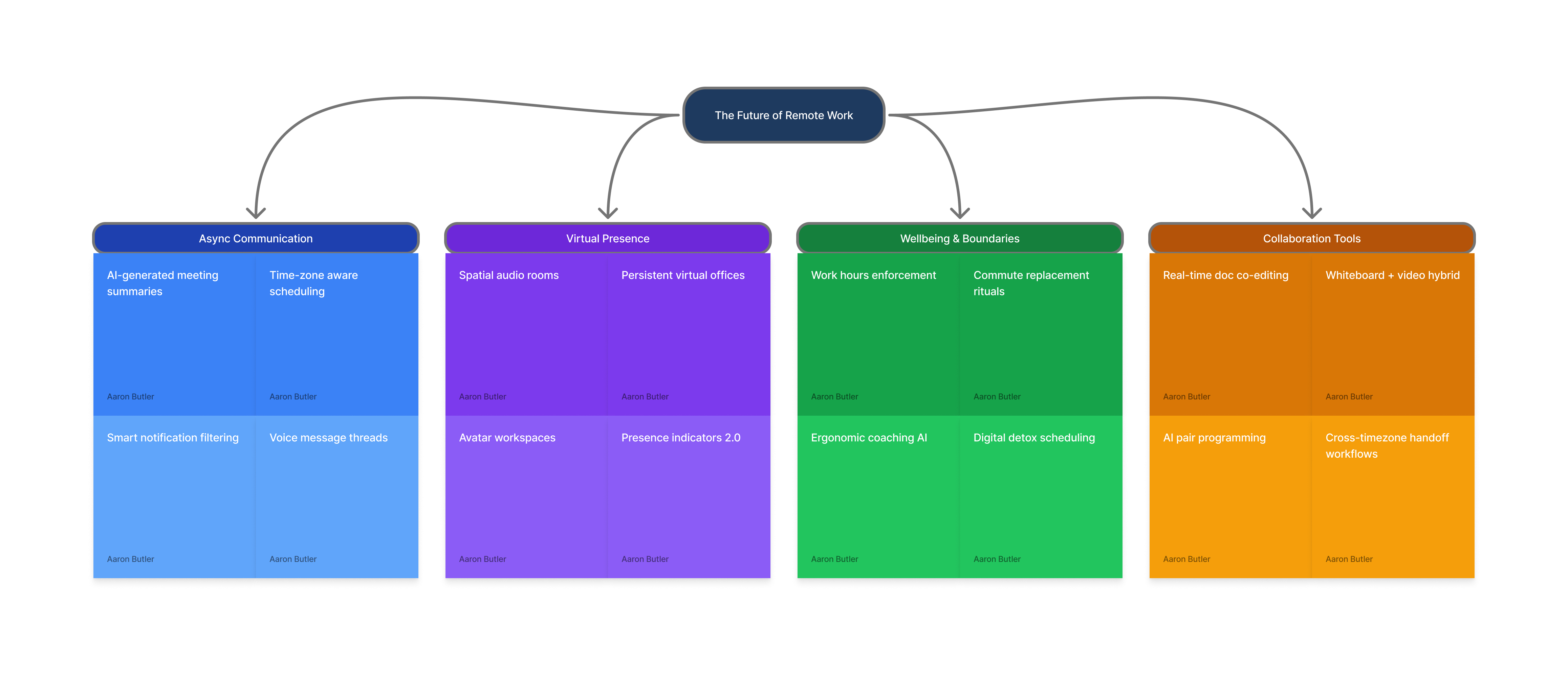
ClaudeJam is a FigJam plugin and MCP server that lets Claude read and write a live board straight from the chat window. I'd ask it to map a flow or lay out a brainstorm, and it would draw the real thing on the canvas while I steered: sticky notes, shapes, connectors and all.
The point is collaboration, not generation. There are plenty of FigJam templates already. What was missing was Claude as a partner you can think out loud with inside the board, shaping structure together, rather than something that hands you a finished file to clean up.
02
Challenge
Closing the handoff loop
Before this, using Claude to help with a FigJam board meant a broken loop. Claude would describe a structure, or produce a diagram as Mermaid or JSON, and then I had to rebuild it by hand in FigJam. Every round of iteration paid that tax again, and the collaborative momentum died at the export step.
ClaudeJam removes the handoff entirely. The board is the shared workspace, edited live, so the thinking never has to stop and get rebuilt somewhere else.
03
Build
Plugin on one end, MCP on the other
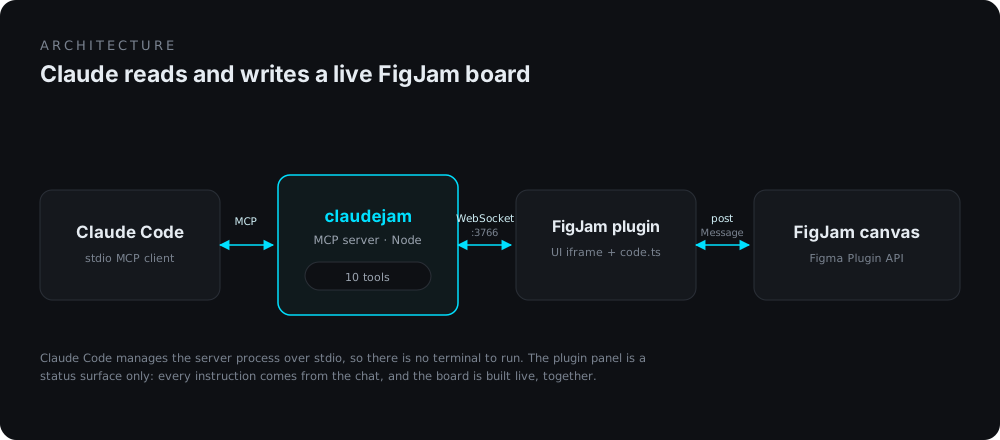
ClaudeJam is two halves working as one. A FigJam plugin lives in the editor and does the actual canvas work through the Figma Plugin API. A local MCP server exposes the tools Claude calls. They talk over a WebSocket, and Claude Code manages the server process itself over stdio, so there is no terminal to babysit: open the plugin, send a message, and within a few seconds the panel shows connected.
A deliberate choice sits underneath: the plugin panel is a status surface, not a control panel. Early on it had buttons to create nodes, and I pulled them. The chat is the command center; the panel just reports connection, page, and activity. It keeps the model clear.
It came together fast. The repo opened on April 3, and on the evening of the 5th the plugin went from an empty scaffold to feature-complete in 14 commits over 33 minutes, with onboarding, a settings panel, and UI polish landing by the end of the same night. Forty commits across five working days, and it was my first Figma plugin, my first MCP server, and my first npm package.
04
Capabilities
Ten tools, and rules to use them
The plugin exposes ten tools. The obvious ones read the board and create or edit nodes and connectors. The less obvious ones are what make the output look intentional instead of sloppy.
Read & write
figjam_read_boardfigjam_create_nodefigjam_create_connectorfigjam_update_nodefigjam_delete_nodesfigjam_get_selection
Layout & navigation
figjam_set_z_orderfigjam_list_pagesfigjam_switch_pagefigjam_get_board_rules
Layout rules, captured not guessed
The detail I care most about is
figjam_get_board_rules. Rather than trust Claude to invent a layout, I built the arrangement I wanted by hand next to the one it had produced, then had it work backwards from mine to the general rules: which direction connectors exit, how much labeled gap to leave between nodes, where the hub sits. Those rules are captured for nine board types (brainstorm, competitive analysis, customer journey, kanban, mood board, retrospective, swimlane, timeline, persona), taken from boards that actually looked right.The decision underneath it is about what a tool description should carry. Rules that apply everywhere stay inline, where the model always sees them. The nine board-specific rule sets don't: they sit behind a tool Claude calls when it needs them, so a new board type can be added without growing the context that every single call pays for. Connectors get similar treatment, with explicit magnet points so arrows route cleanly instead of cutting across nodes, and a z-order tool so a container never buries its own contents.
Onboarding
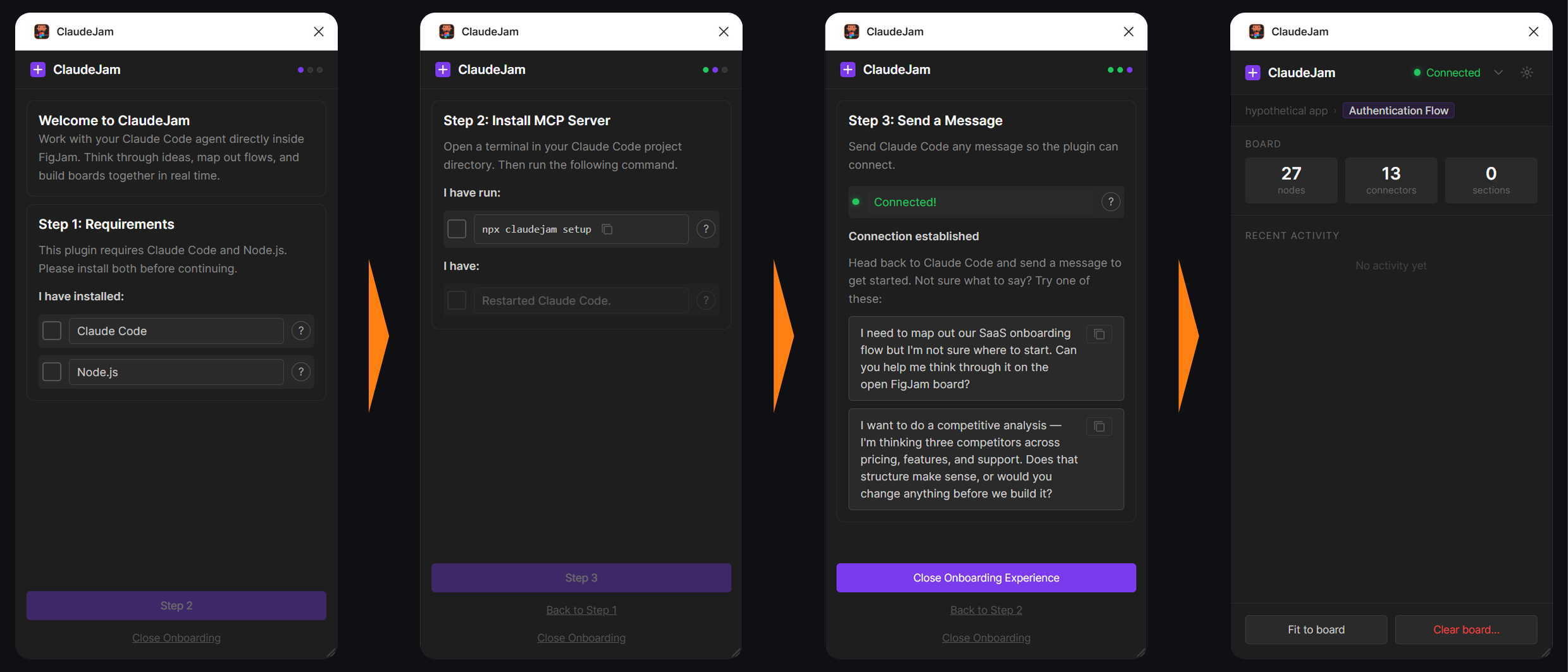
The plugin walks a first-time user through three steps: confirm they have Claude Code and Node.js, run a one-line setup command, then send Claude a message so the connection can establish. The last step ends with two example prompts, because the hardest part of a new tool is knowing what to ask it for first. Both are written as questions rather than commands — one of them asks Claude whether the proposed structure makes sense before building anything — which is the whole positioning in miniature.
Learning an API in public
Two hours after the first line of plugin code, there was a gotchas file in the repo: 171 lines across twelve sections covering font loading, connector stroke caps, section children, manifest quirks, network access inside iframes, and the rest. The commit history reads the same way. A run of commits corrects wrong assumptions in sequence, one connector type at a time, each one a guess that turned out wrong and got fixed. I'd never touched the Figma Plugin API before this. Writing the surprises down as they happened is the only reason the second half of the build went faster than the first.
05
Outcome
Submitted, but too late
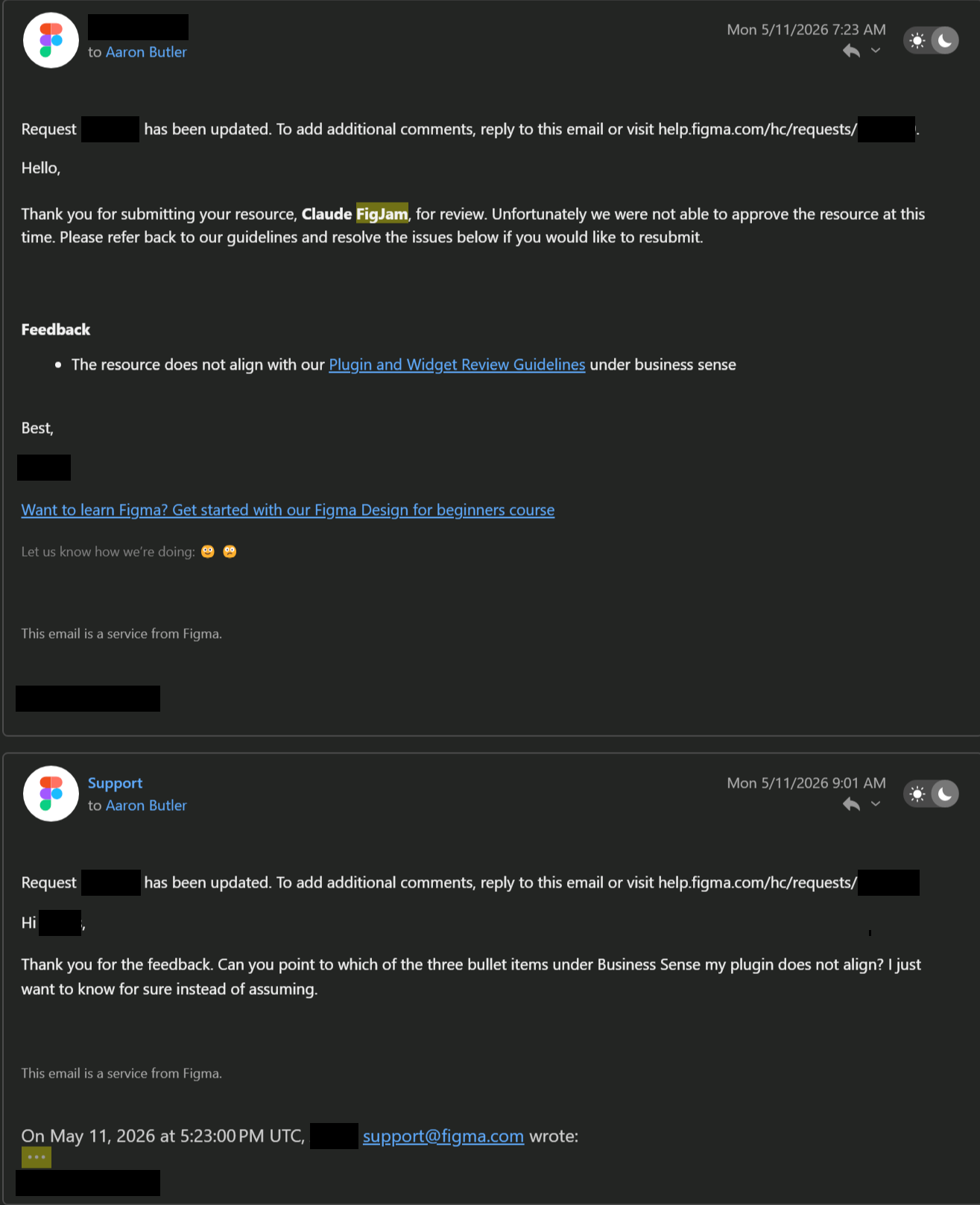
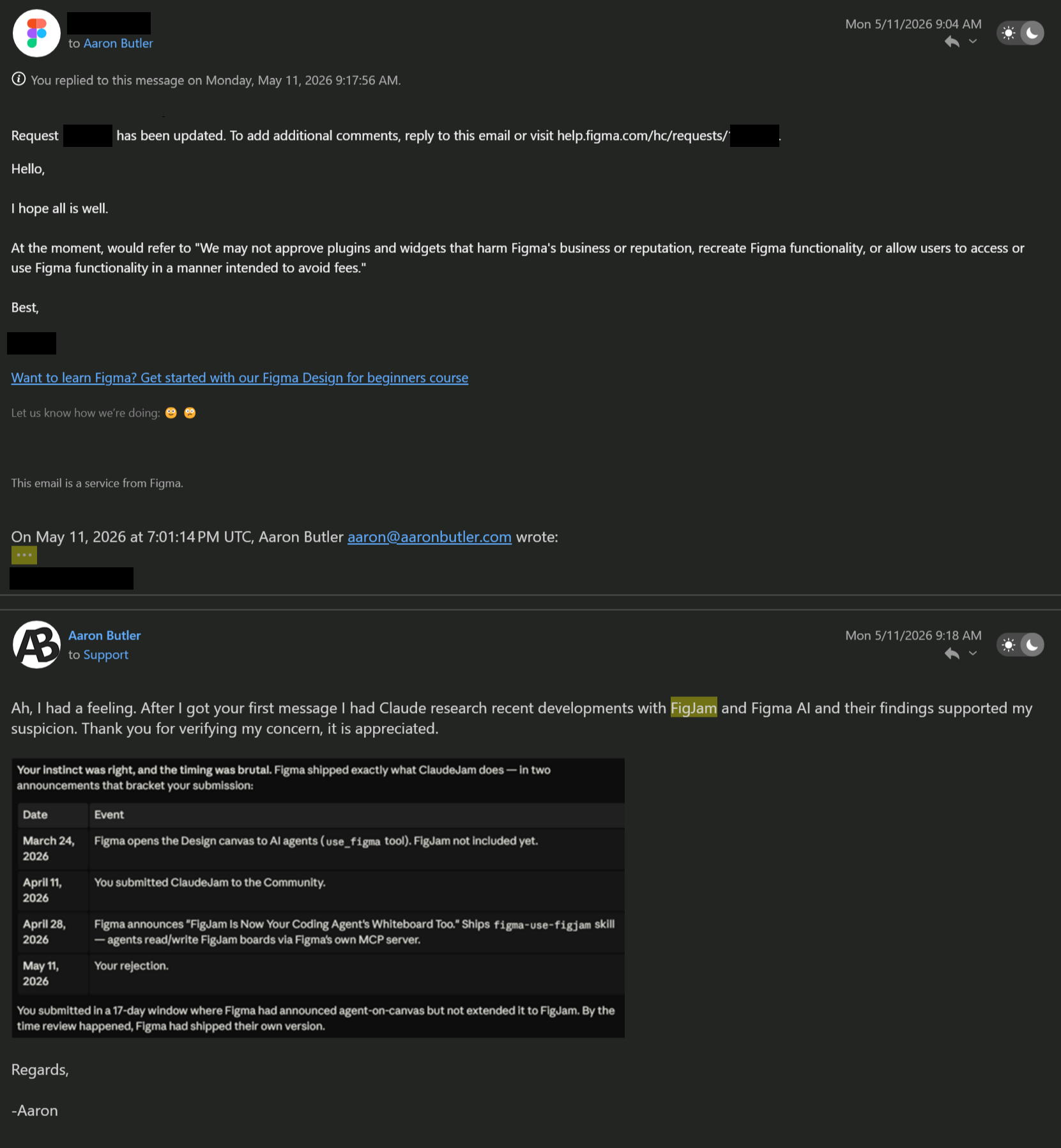
ClaudeJam is the most finished of my bridges and the first thing I submitted to the Figma Community. Seventeen days after I submitted, Figma announced FigJam support for coding agents and shipped their own version. The rejection came on May 11, citing the guideline about recreating Figma functionality. I wrote back asking which specific line my plugin failed, because I wanted to know for sure instead of assuming, and the answer confirmed it.
The timing stung, though there's some validation in having built the thing the platform decided to build a few weeks later. Since it never got a Community listing, I made the plugin public on GitHub for anyone who wants to try it. It's still part of how I work, too: months later I used it to rebuild the service blueprint for my Seattle Social Good Series study. It also showed that the approach behind my Unreal and s&box bridges, Claude working through a small local server, isn't limited to game engines; it works just as well on a design canvas.